Google Play Store PC
Gives you access to any type of Apk Android App on your Windows PC.

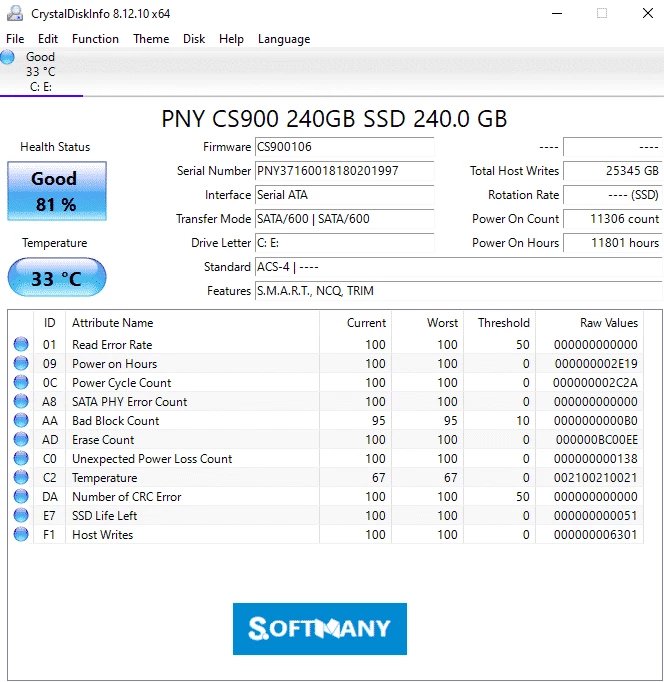


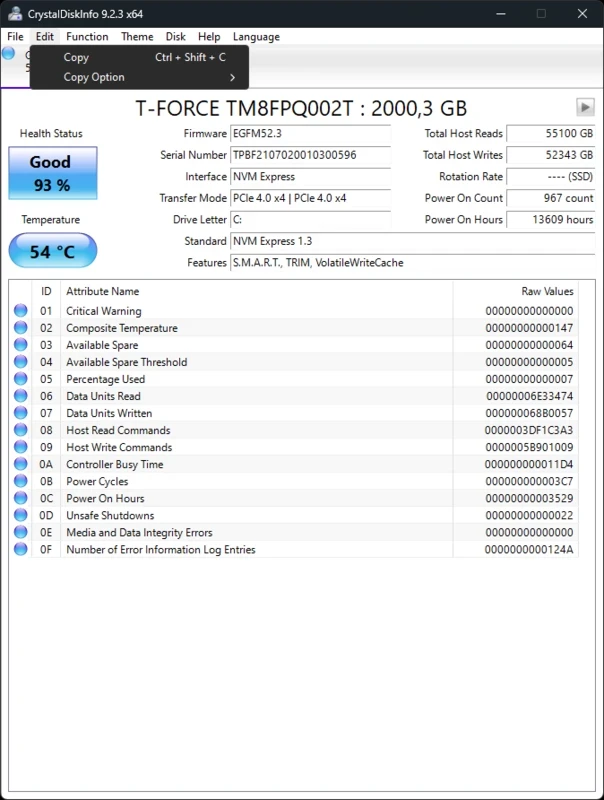


CrystalDiskInfo offers quick diagnostics for your hard drive, SSDs, pen drives, SD cards, and so on. It highlights potential issues such as temperature, power-on hours, read error rates, and so on, using the color-coded system. It allows the users to read S.M.A.R.T data from drivers, no matter they are external or internal.
The tool offers a user-friendly interface within a tabbed layout and is simple to navigate. Real-time updates help to keep your system data up-to-date. It is a simple and reliable utility with free of cost accessibility, enabling users to anticipate possible failures and apply different maintenance operations.
CrystalDiskInfo developed by hiyohiyo, is an MIT-licensed S.M.A.R.T utility. It is an open-source tool that enables users to test the diagnostics of SSDs and uses a filesystem to read and write in a volume-dependent way. SSDs as compare to hard drives, excel at random IO, and don’t require any specific position to read from or write to.
The simple and intuitive utility offers optimal performance within real-time analysis and key metrics of your system. The tool, with a straightforward design and portability, offers efficient drive maintenance.
The clear and intuitive interface, despite of loaded with technical details, offers quick and easy navigation. It runs quickly to identify possible problems and handles multiple hard drives simultaneously while providing instant information for each of them. On top of the screen, you will find the Temperature and general Health Status of your device, and the bottom part is equipped with details of SMART information.
S.M.A.R.T (Self-Monitoring, Analysis, and Reporting Technology) is a built-in feature available in hard drives and SSDs. It enables the users to track different parameters such as temperature, read & write errors, power-on hours, and a lot of others. The entire procedure is simple, as all connected storage devices with your computer are displayed here, and the general health status with estimated percentage for SSD drives is available on the left of the screen. It will alert you in case of failure of any drive, and enables you to back up data before the drive fails. In addition, you are capable of watching the serial number, firmware, interface, letter assigned to the unit, and so on.
It is the best solution for professional users who can, with minimum effort, keep their disks in boost condition, as it enables the users to control the health and condition of their hard drives thoroughly. The detailed interpretation of SMART data manages disks more reliably while providing unique and deep insights. The simple and user-friendly interface is more comfortable, even for new learners.
The key feature is the monitoring of your computer’s health quickly while offering various parameters, including current temperature, total run time, speed of reading and writing, read errors, number of power-ups, and so on. It gives clear statuses about the health of your computer, including Good, Caution, or Bad, and enables users to understand the level of their drives.
The app also enables users to set up alerts to save their storage drives from going out of range, as it will inform them before anything goes wrong. For example, when your temperature gets too high or any other error peeps. These custom alerts make catching problems quickly, and enable you to take action on time without losing anything.
The software within lightweight capacity proves very light on the system resources, and runs more reliably in the background without interfering with your other activities. So, there wouldn’t be any slowdown or resource hogging, and continuous monitoring of your disks. In addition, you are also capable of controlling the advanced drive settings, including AAM/APM, setting up email alerts for potential issues, and so on.
The support for a huge variety of technologies and standards, and ensured compatibility for various types of hardware configuration, makes the software one of the best choices for professionals and new learners as well. It can detect connected disks with SATA, NVMe, USB, and RAID. The support for advanced features such as TRIM on SSDs offers enhanced maintenance to extend the life of your drives.
Pros
Cons

Gives you access to any type of Apk Android App on your Windows PC.

PC App Store download, install, and keeps up-to-date your PC programs

free emulator to play Android apps on your pc with extra performance, reliability

Bijoy Bayanno the most powerful software to write Bengali language on PC

Media Creation Tool is upgrading and installing Windows 10 bootable installed disks.

Rufus easily change your USB Flash to a bootable ISO flash drives.